a man looking at his computer screen

FAQs

This FAQ section is provided to help answer common questions and support day‑to‑day banking needs. Whether guidance is needed for Digital Banking, Bill Pay, eStatements, Mobile Banking, or Remote Deposit, this resource is here to offer clear information and make answers easier to find.


Am I eligible for Digital Banking?
Personal and business clients are eligible.
 
What can I do with Digital Banking?
Manage your accounts anytime with easy self-service tools. Check balances and view recent transactions, transfer funds, pay bills, and send P2P payments. Deposit checks with Mobile Deposit, set up alerts, order checks, and place stop payments. You can even track where your money is going using the spending wheel, which automatically categorizes your purchases to help you stay on top of your budget.
 
How do I enroll (Self Enrollment)?
Banking customers who have an email address on file can select “Enroll.” After completing your information, you’ll receive a confirmation email with a secure verification link (active for 1 hour). For security purposes, open the link on the same device and browser you used to enroll to complete your setup.
 
How do I download the CIB Mobile App?
You can download the CIB Mobile App from your device’s app store:
 
download on the apple app store badge
 
get it on the google play badge
 
How much transaction history can I see online?
You are able to access up to 18 months of transaction history. Transaction history begins the day you sign up and builds to 18 months of history. 
 
When will transfers show in my account?
The transfer cut-off time for the current day's business is 6:00 pm CST. Any transfers made after this time will not be completed until the next business day.
 
What happens if I forget my Digital Banking password?
If you forget your password, you can use the  “Forgot Password” function found within Digital Banking.
 
What happens if I get locked out of Digital Banking?
You can be locked out of digital banking after repeated failed login attempts. For your security, we need to verify your identity to reset your account access. If you find yourself locked out of digital banking, call Customer Service at 952-915-8525.
Am I eligible to enroll in Bill Pay?
Digital Banking clients with personal or business checking accounts can enroll.
 
Is Bill Pay secure?
Yes. Bill Pay keeps your information protected by avoiding paper checks, preventing your account number from being stored with billers, and using encrypted ACH payments whenever possible. Only you can access your payment details and history, helping reduce fraud and data breach risks.
 
Who can I pay?
Any payee with a valid address in the U.S. or Puerto Rico—individuals or companies. When possible, payees receive electronic payments; otherwise, a check is mailed. Enter your account number exactly as it appears on the bill; if address matching is required, select the remittance address printed on your bill.
 
What is P2P and how does it work?
P2P (person-to-person) payments let you send money to individuals quickly and securely. Depending on the recipient, payments can be delivered by ACH, email, text message, or mailed check—no extra apps needed.
 
When are Bill Pay payments processed?
Monday–Friday:
  • Before 7:00 a.m. CT: processed at 7:00 a.m.
  • 7:00 a.m.–2:00 p.m. CT: processed at 2:00 p.m.
  • After 2:00 p.m. CT: processed next business day
 
Weekends & Holidays
Items submitted on a weekend or holiday are processed on the next business day.
 
Can I stop a Bill Pay payment?
You can place a stop payment on a check after it has been printed or mailed (fee applies). Electronic payments cannot be stopped once sent.
 
When is my account debited?
Electronic payments:
  • Debited the same day if submitted by 2:00 p.m. CT
  • Submitted after 2:00 p.m. CT → debited the next business day
 
Check payments:
  • Debited when the check is presented and clears with the payee
 
Can I schedule recurring or multiple payments?
Yes. Frequencies include weekly, twice monthly, monthly, quarterly, and more. You can also make multiple payments to the same payee on the same day.
 
Can I edit the amount on a scheduled recurring payment?
Yes. You can update the dollar amount starting the next business day after the scheduled payment date.
 
How do I know if a payee is electronic or a check?
When you schedule a payment, the delivery method is shown on the payment submission screen. Look at the bottom of the page, just below the Submit button, to see whether the payment will be sent electronically or by check.
 
Can I edit a payee address?
Yes. You can update a payee’s address, but only through Online Banking. Go to Payees→ select the payee → Edit Payee. This option is not available in the mobile app.
What is Mobile Deposit?
Mobile Deposit lets you deposit an endorsed check by taking photos of it within the CIB mobile app. If you qualify, Mobile Deposit will be activated within three business days after you submit your enrollment.
 
What are Mobile Deposit limits?
Mobile Deposit limits vary by customer and account history. You can view your personal limits anytime by opening the Mobile Deposit feature in the CIB mobile app and selecting Deposit Limits.
We provide same-day availability whenever possible, but all mobile deposits may be subject to standard check hold policies.
 
How do I endorse and handle checks?
Sign the check and write “For mobile deposit only at Citizens Independent Bank.” Retain securely for 14 days (or until posted), then destroy.
 
Is Mobile Deposit secure?
Yes. Uses SSL with 128-bit encryption and the same security standards encryption as Digital Banking.
What are eStatements?
Electronic versions of statements/notices with the same information as paper—delivered online with email notification.
 
Is there a cost? Are they secure?
No cost. Protected with industry-standard encryption (Digital Banking).
 
How do I enroll?
Log in to Online Banking and select the eStatements option on your dashboard. Follow the on‑screen steps to complete enrollment. To receive your next statement electronically, please enroll two full business days before your statement cycle ends.
 
I enrolled but still received a paper statement — why?
Enrollment must be completed two business days before your statement cycle ends; otherwise, paper delivery will continue until the following cycle. Paper statements also resume automatically if the email address on file becomes inactive or undeliverable.
 
Can I receive both paper and eStatements?
No. Once enrolled in eStatements, paper statements stop.
 
How long are documents stored?
Statements are available online for 18 months. While eStatements don’t display check images, you can view check images anytime by reviewing your account’s transaction activity.
 
Locked out of Digital Banking — does that affect eStatements?
Yes. eStatements access uses your Digital Banking credentials. Use the “Forgot Password” function within Digital Banking to reset your login credentials.
 
Deleted the email — how do I retrieve my eStatement?
The email is for informational purposes only. Your eStatements are always available online. Just log in to Online Banking, go to eStatements, and select the statement you want to view.
What is the difference between my current balance and my available balance?
Your current balance is the total amount in your account at that moment. Your available balance may be different because it reflects pending deposits and withdrawals that haven’t fully cleared yet. It may also include any overdraft protection you have. Because of this, your available balance isn’t always the same as your actual spendable balance.
 
Are digital services secure?
Yes. CIB’s digital services use industry-standard encryption and secure authentication. Enable alerts, use strong, unique passwords, multi-factor authentication or Authenticator apps, and biometrics to keep your accounts secure, and keep contact info current.
What is TeleBANK and how do I call it?
TeleBANK is CIB’s 24-hour telephone banking service. Call 952 925 3344.
 
What can I do by phone?
From the main menu, you can:
  • Account Balance — Press 1 (follow prompts for checking, savings, loans, and CDs)
  • Account History — Press 2
  • Transfer Funds / Make a Payment — Press 3
  • Activate a Debit Card — Press 4
  • Hear Existing Scheduled Transfers (ACH transactions / scheduled funds transfers) — Press 5]
  • Change Overdraft Options (opt in / opt out of Cover Your Account (CYA)) — Press 6
  • Change TeleBANK PIN — Press 7
  • Bank Information — Press 8
 
Are there shortcuts or voice commands?
Yes. Helpful commands include Speech Recognition (8*), Help (1*), Main Menu (3*), Go Back (*), Skip (5*), Repeat (#), Hang up (7*), and Operator (0).
 
Tips for faster navigation
Have your account information ready, use Skip (5*) to advance, and Repeat (#) if you need to hear options again. You can return to the Main Menu (3*) anytime.
 
First-time user?
If this is your first time using TeleBANK, you will be asked to verify your identity and establish a 6-digit TeleBANK PIN.
Need help with Digital Banking, Bill Pay, or eStatements?
  • Client Service: 952 915 8525
  • General assistance: 952 926 6561
For lost/stolen cards and additional numbers, see Contact Us. (link to Contact Us form)
 
Can I get a copy of a cancelled check?
Yes. Contact us; a fee may apply.
You can update your address, phone number, or email directly through Digital Banking. Just click your profile icon, then select Edit next to the information you want to update. 
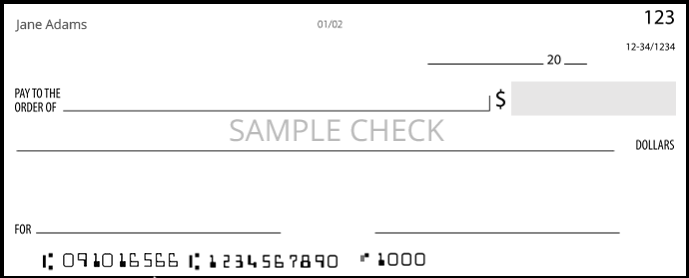
The routing number is 091016566.


We provide personal banking, business banking, mortgage lending, and financial services to businesses and individuals across the western Twin Cities. Explore our local banking locations in Saint Louis Park, Robbinsdale, Hopkins, and Plymouth to find the branch most convenient for you.